Introducing the Venturu MCP Server: Search the Marketplace from Your AI
Your AI assistant can now search 4,850+ verified business listings, find brokers in any state, and send inquiries — all through one URL. No API key. No switching apps. Here's how Venturu MCP works and why it matters.
Your AI already knows the market. Now it can search it.
Every week, thousands of entrepreneurs open their browsers, type a query, scroll through listings, click into details, compare financials, and repeat. Tab after tab. Platform after platform.
What if they didn't have to?
Today we're launching the Venturu MCP Server — a single connection that gives any AI assistant direct access to the largest free marketplace for businesses for sale in the United States.
One URL. Nine tools. Over 4,850 verified business listings across all 50 states.
What is MCP?
MCP stands for Model Context Protocol — an open standard that lets AI assistants connect to external data sources and take actions on behalf of users. Think of it as a universal plug that lets your AI reach beyond its training data and into live, real-world systems.
Instead of copying data between your AI and a website, MCP lets the AI talk directly to the source.
Venturu is one of the first business marketplaces to ship a production MCP server. That means if you use Cursor, Claude Desktop, ChatGPT, VS Code Copilot, Windsurf, or any MCP-compatible client, your assistant can now search our full inventory — without you ever leaving the conversation.
What your AI can do
The Venturu MCP server exposes nine tools:
Search
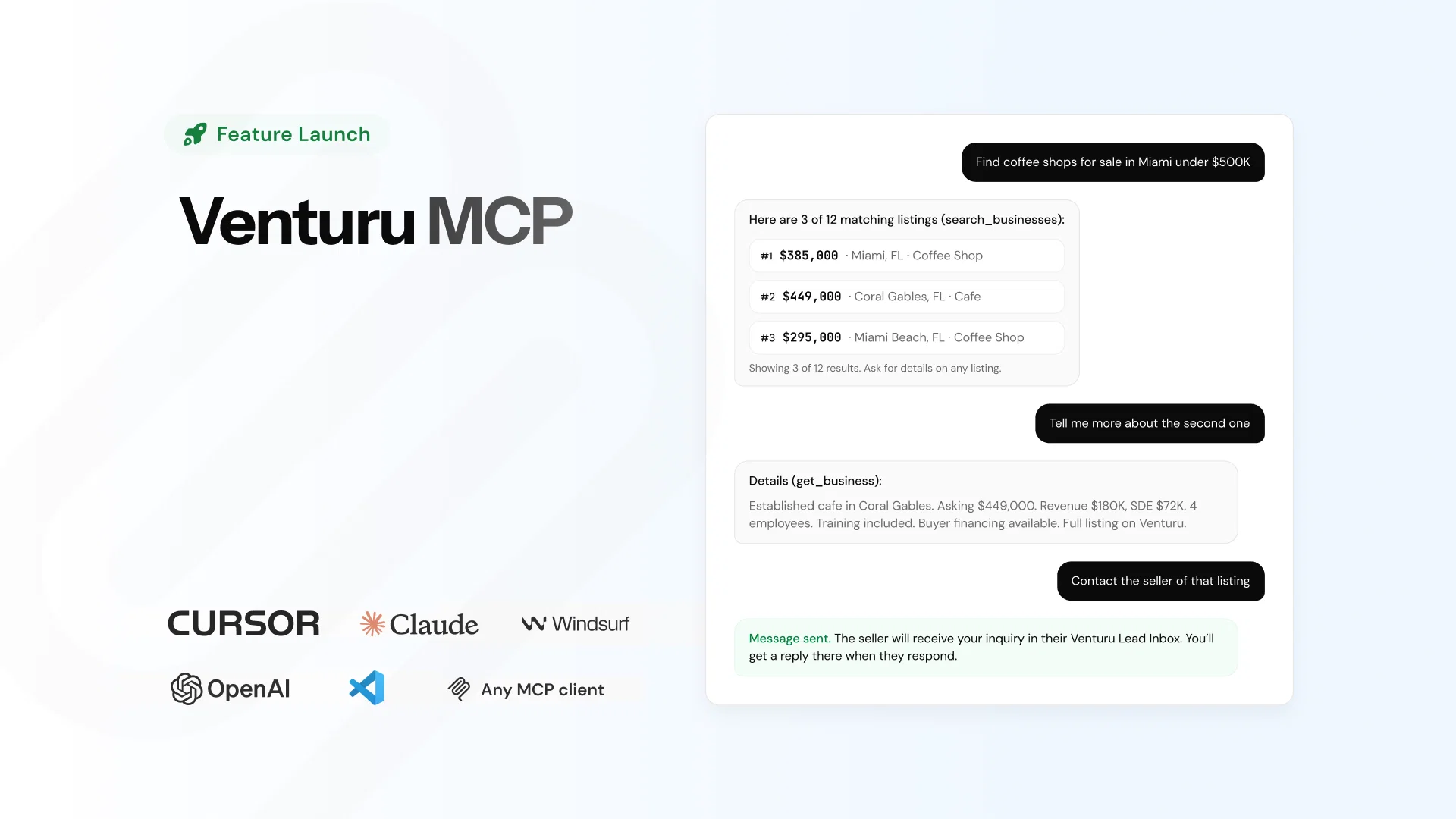
- search_businesses — Query by location, price range, revenue, SDE, industry, and 20+ filters. Returns up to 15 results with pagination.
- search_brokers — Find verified brokers by city, state, specialty, language, and opportunity score.
Details
- get_business — Pull the full profile for any listing: financials, lease terms, facilities, location, photos.
- get_broker — View a broker's full profile, specialties, active listings, and languages spoken.
Contact
- contact_seller — Send a message to a listing's seller directly from the conversation.
- contact_broker — Reach a broker by name. Your AI sends the message; you get the reply in your Lead Inbox.
Reference
- list_business_categories — Browse 230+ business types and industries with IDs for precise filtering.
- list_languages — List all languages with IDs for broker language matching.
Identity
- who_am_i — Verify the authenticated user's identity.
Searching and browsing are free. Contact tools require a free Venturu account — your client will prompt you to sign in once via OAuth.
How it works: connected in under a minute
Step 1: Add the server URL
Open your AI client's MCP settings and add one line:
Your AI already knows the market. Now it can search it.
Every week, thousands of entrepreneurs open their browsers, type a query, scroll through listings, click into details, compare financials, and repeat. Tab after tab. Platform after platform.
What if they didn't have to?
Today we're launching the Venturu MCP Server — a single connection that gives any AI assistant direct access to the largest free marketplace for businesses for sale in the United States.
One URL. Nine tools. Over 4,850 verified business listings across all 50 states.
What is MCP?
MCP stands for Model Context Protocol — an open standard that lets AI assistants connect to external data sources and take actions on behalf of users. Think of it as a universal plug that lets your AI reach beyond its training data and into live, real-world systems.
Instead of copying data between your AI and a website, MCP lets the AI talk directly to the source.
Venturu is one of the first business marketplaces to ship a production MCP server. That means if you use Cursor, Claude Desktop, ChatGPT, VS Code Copilot, Windsurf, or any MCP-compatible client, your assistant can now search our full inventory — without you ever leaving the conversation.
What your AI can do
The Venturu MCP server exposes nine tools:
Search
- search_businesses — Query by location, price range, revenue, SDE, industry, and 20+ filters. Returns up to 15 results with pagination.
- search_brokers — Find verified brokers by city, state, specialty, language, and opportunity score.
Details
- get_business — Pull the full profile for any listing: financials, lease terms, facilities, location, photos.
- get_broker — View a broker's full profile, specialties, active listings, and languages spoken.
Contact
- contact_seller — Send a message to a listing's seller directly from the conversation.
- contact_broker — Reach a broker by name. Your AI sends the message; you get the reply in your Lead Inbox.
Reference
- list_business_categories — Browse 230+ business types and industries with IDs for precise filtering.
- list_languages — List all languages with IDs for broker language matching.
Identity
- who_am_i — Verify the authenticated user's identity.
Searching and browsing are free. Contact tools require a free Venturu account — your client will prompt you to sign in once via OAuth.
How it works: connected in under a minute
Step 1: Add the server URL
Open your AI client's MCP settings and add one line:
{ "mcpServers": { "venturu": { "url": "https://venturu.com/mcp" } } }
That's it. No API key for search and browsing.
Step 2: Authenticate (optional)
Want to message sellers and brokers from inside your AI? Connect a free Venturu account. Your client handles the OAuth flow — you'll approve it once, and tokens are encrypted and short-lived.
Step 3: Start searching
Ask your AI anything:
- "Find me restaurants for sale under $500K in Miami."
- "Show me the top-rated brokers in Texas who speak Spanish."
- "Get me the full financials on that coffee shop in Portland."
- "Send a message to the seller asking about the lease terms."
Your assistant has the full inventory. No app switching. No copy-pasting. No tabs.
Why we built this
Venturu exists to remove friction from the business buying and selling process. Paid listings kept the SMB market artificially small for 20 years. We removed that bottleneck by making listing free.
MCP removes the next layer of friction: the search itself.
Buyers shouldn't have to context-switch between their AI tools and a marketplace website. The data should meet them where they already work. For developers, that's Cursor or VS Code. For analysts, it's Claude Desktop. For everyone else, it's ChatGPT.
The businesses are verified. The brokers are real. The data is live. And now your AI can access all of it through a single URL.
Built for security, built for scale
We didn't cut corners on the infrastructure:
- OAuth 2.0 with PKCE — Industry-standard authentication. No shared secrets. Tokens are encrypted with AES-256.
- Rate limiting — Two tiers: IP-based for anonymous requests, per-user for authenticated sessions. Prevents abuse without slowing legitimate use.
- Privacy by default — Private contact information is never exposed. Your AI can send messages, but sensitive data stays protected.
- Streamable HTTP transport — The server uses the latest MCP transport standard. No WebSocket complexity. Works through firewalls and proxies.
Compatible with the tools you already use
The Venturu MCP server works with any client that supports the Model Context Protocol:
- Cursor — Search listings while you code
- Claude Desktop — Research businesses in conversation
- ChatGPT — With rich widget cards for listings and brokers
- VS Code Copilot — Marketplace data inside your editor
- Windsurf — Full MCP support
- Any MCP-compatible client — One standard, universal access
For ChatGPT specifically, we built rich interactive widgets that render listing and broker cards with direct action buttons — right inside the chat.
The numbers
- 4,500+ verified business listings
- 1,400+ verified brokers
- All 50 US states covered
- 9 tools available
- 230+ searchable business categories
- $0 to search, browse, and connect
Get started now
Add the Venturu MCP server to your AI assistant in under a minute. Search the full marketplace. Contact sellers and brokers. No subscription. No API key for search.
Server URL: https://venturu.com/mcp
Full setup guide and documentation: venturu.com/venturu-mcp
The marketplace is open. Your AI is ready. Connect them.
Next step
Get your free business valuation in 2 minutes
Use the same valuation engine our sellers use before listing. No cost, no commitment.